Web UI Permission System
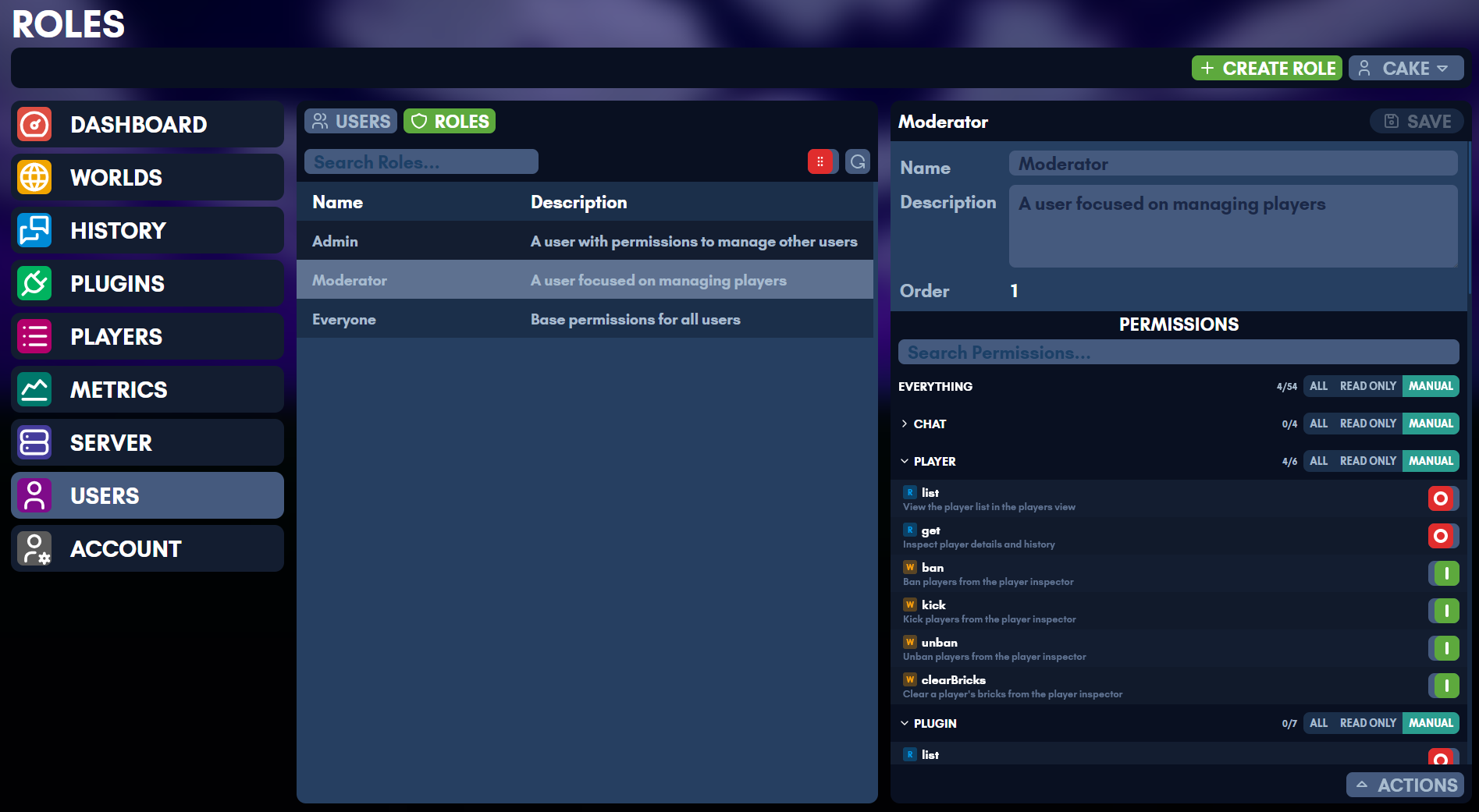
Roles granted here are omegga’s own, for who may do what in the web UI. They are separate from the in-game roles the console grants, which the same person often manages side by side.
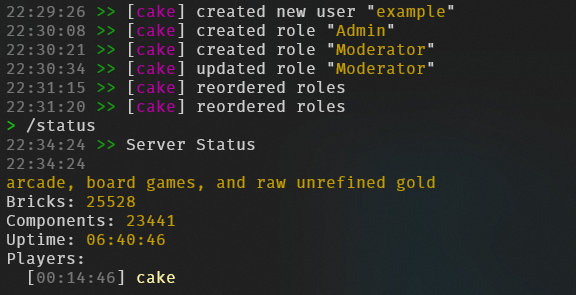
The web UI uses a hierarchical, purely additive permission model. Permissions can only grant access, never deny it.
Data Model
Each user has a PermissionSet:
interface PermissionSet {
  root: 'all' | 'read' | 'off';
  domains: Partial<Record<Domain, 'all' | 'read'>>;
  scopes: Partial<Record<Scope, boolean>>;
}
A server-wide default PermissionSet serves as a fallback for all users. Roles are additive collections of permissions that can be assigned to users.
Resolution
When checking whether a user has a specific scope, the resolver walks these levels in order. The first level that produces a definite answer wins.
1. Owner bypass    - isOwner grants everything
2. Root level      - 'all' grants everything; 'read' grants read-only scopes; 'off' falls through
3. Domain level    - 'all' grants all scopes in that domain; 'read' grants read-only scopes; absent falls through
4. Scope level     - true grants; absent falls through to role permissions
5. Role perms      - union of all assigned role permissions + default permissions, resolved with the same root/domain/scope logic
6. Not granted     - false
The readOnly flag on each scope definition determines whether “Read Only” mode at root or domain level grants that scope.
Roles
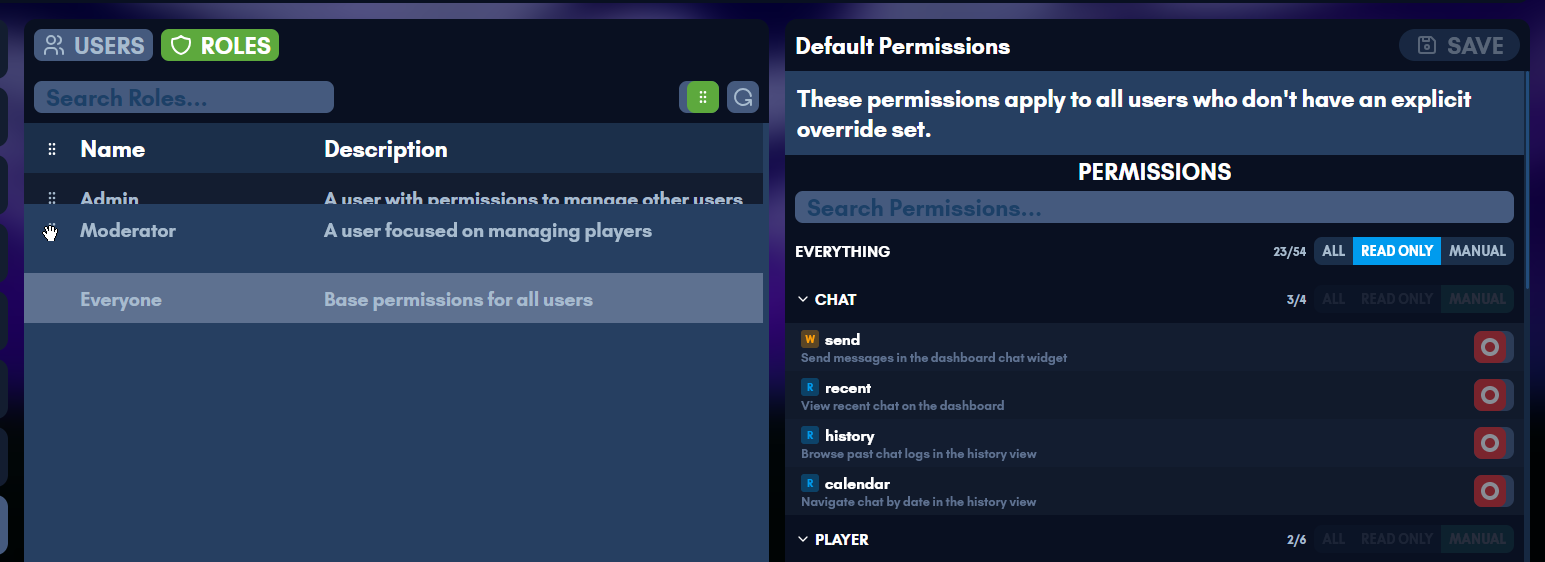
Roles are named, ordered collections of permissions stored as PermissionSet values. A user’s effective permissions are the union of their direct permissions, all assigned role permissions, and the default permissions.
Ordering and Hierarchy
Each role has a numeric order value. Higher order = more powerful. The order is used solely for hierarchy enforcement (preventing privilege escalation), not for permission resolution (which is purely additive/union).
Hierarchy rules for non-owner users:
- A user can only manage (edit, delete, reorder) roles with order strictly less than their highest role that grants the relevant permission
- A user cannot grant or revoke roles at or above their own level
- A user cannot grant permissions they do not possess to a role
- Reorder requires
role.editfrom an assigned role (not from default permissions) - New roles are created at order 1 (weakest), with existing roles bumped up
The display sorts roles descending by order (most powerful at top).
Default Permissions
Default permissions apply to all users as a baseline fallback. They are edited separately from roles via the role.defaultPermissions scope and appear as the “Everyone” entry at the bottom of the roles list.
Levels
Root
| Value | UI Label | Behavior |
|---|---|---|
all | All | Grants every scope |
read | Read Only | Grants only scopes marked readOnly: true |
off | Manual | Falls through to domain and scope checks |
Domain
| Value | UI Label | Behavior |
|---|---|---|
all | All | Grants every scope in this domain |
read | Read Only | Grants only readOnly scopes in this domain |
| (absent) | Manual | Falls through to individual scope toggles |
Domains are purely additive. Setting a domain to “Manual” removes it from the domains map rather than storing a deny value.
Scope
Permissions are purely additive. true grants the scope, absent (or toggled off) falls through to role/default permissions. There is no way to explicitly deny a scope – toggling a scope off simply removes the user-level override so the role/default permissions apply.
Domains and Scopes
Each scope belongs to exactly one domain and is either read-only (R) or read-write (W).
Chat
| Scope | R/W | Description |
|---|---|---|
chat.send | W | Send messages in the dashboard chat widget |
chat.recent | R | View recent chat on the dashboard |
chat.history | R | Browse and search past chat logs in the history view |
chat.calendar | R | Navigate chat by date in the history view |
Player
| Scope | R/W | Description |
|---|---|---|
player.list | R | View the player list in the players view |
player.get | R | Inspect player details and history |
player.ban | W | Ban players from the player inspector |
player.kick | W | Kick players from the player inspector |
player.unban | W | Unban players from the player inspector |
player.clearBricks | W | Clear a player’s bricks from the player inspector |
Plugin
| Scope | R/W | Description |
|---|---|---|
plugin.list | R | View installed plugins in the plugins view |
plugin.get | R | Inspect plugin details and configuration |
plugin.config | W | Edit plugin settings in the plugin inspector |
plugin.load | W | Load plugins from the plugin inspector |
plugin.unload | W | Unload plugins from the plugin inspector |
plugin.toggle | W | Enable or disable plugins in the plugins view |
plugin.reloadAll | W | Reload all plugins from the plugins view |
Server
| Scope | R/W | Description |
|---|---|---|
server.status | R | View server status on the dashboard and server view |
server.start | W | Start the server from the server view |
server.stop | W | Stop the server from the server view |
server.restart | W | Restart the server from the server view |
server.update.check | W | Check for server updates in the server view (runs SteamCMD) |
server.update.run | W | Run server updates from the server view |
server.autorestart.get | R | View auto-restart settings in the server view |
server.autorestart.set | W | Change auto-restart settings in the server view |
server.utilization | R | View CPU, memory, and disk usage on the dashboard |
User
| Scope | R/W | Description |
|---|---|---|
user.list | R | View web UI user accounts in the users view |
user.create | W | Create new user accounts in the users view |
user.passwd | W | Change other users’ passwords in the user inspector |
user.ban | W | Disable or re-enable users in the user inspector |
user.delete | W | Permanently delete user accounts |
user.permissions | W | Edit user permissions in the users view |
user.grantRole | W | Assign and revoke roles to/from users |
user.readMfa | R | View MFA status of other users in the user inspector |
user.resetMfa | W | Reset MFA for other users in the user inspector |
World
| Scope | R/W | Description |
|---|---|---|
world.list | R | View available worlds in the worlds view |
world.active | R | See which world is currently loaded |
world.next | R | See which world will load next |
world.revisions | R | View world save revisions in the world inspector |
world.meta | R | View world metadata in the world inspector |
world.load | W | Load worlds from the world inspector |
world.use | W | Set the default world in the worlds view |
world.save | W | Save the current world from the worlds or server view |
world.create | W | Create new worlds in the worlds view |
Role
| Scope | R/W | Description |
|---|---|---|
role.list | R | View roles in the roles view |
role.edit | W | Create, edit, delete, and reorder roles |
role.defaultPermissions | W | Edit the default permissions that apply to all users |
role.grantPermission | W | Add or remove permissions within roles |
Users
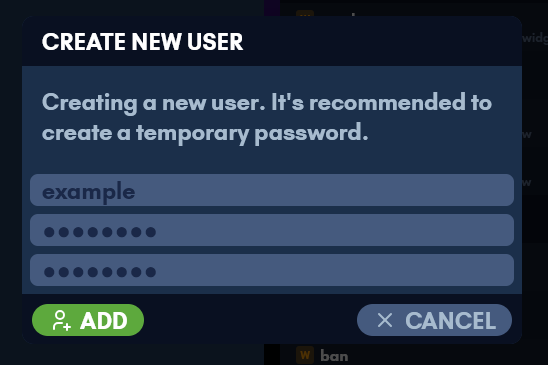
Users are created from the web UI, each with their own permissions and roles. The Users page adds one under Actions.

Self-Service
All authenticated users can access the /account page regardless of permissions. This page shows the user’s own account info, MFA management (TOTP, passkeys, recovery codes), and password change.
The user.self endpoint (scoped to session.info) returns the current user’s data without requiring user.list. The user.passwd endpoint allows any user to change their own password (requires current password); changing another user’s password requires the user.passwd scope. MFA management endpoints (mfa.*) are scoped to session.info and require password verification for sensitive operations (TOTP setup/disable, passkey removal, recovery code generation).
Enforcement
Backend
Every tRPC endpoint is wrapped with protectedProcedure(scope), which runs requireScope middleware. The middleware:
- Rejects unauthenticated requests (
UNAUTHORIZED) - Allows owners unconditionally
- Resolves the scope against the user’s permissions + role permissions + server defaults
- Rejects with
FORBIDDENif not granted
Subscription endpoints (like server.onStatus, chat.onMessage) share the scope of their corresponding query endpoint rather than having separate scopes.
Role management endpoints additionally enforce hierarchy checks via checkRoleHierarchy, which verifies the actor’s highest role granting the required scope has an order strictly greater than the target role’s order.
Frontend
On login, the session response includes resolvedScopes – a flat Record<string, boolean> with every scope pre-resolved (including role and default permissions). The frontend stores this in a nanostore ($resolvedScopes).
useHasScope(...scopes)– returns true if the user has all specified scopesuseHasAnyScope(...scopes)– returns true if the user has any of the specified scopesuseRequireScope(scope)– redirects to/if the user lacks the scope
The permission and scope definitions are shared between frontend and backend via @backend/scopes.
Sidenav Visibility
Each sidenav link is gated by a specific scope:
| Link | Required Scope | Always Visible |
|---|---|---|
| Dashboard | – | Yes |
| Worlds | world.list | No |
| History | chat.history | No |
| Plugins | plugin.list | No |
| Players | player.list | No |
| Server | server.status | No |
| Users | user.list | No |
| Roles | role.list (shown when user lacks user.list) | No |
| Account | – | Yes |
The Users sidenav item also highlights when on /roles. If a user has role.list but not user.list, a Roles-only sidenav item appears instead.
View Access
Each view redirects to the dashboard if the user lacks its required scope:
- Worlds requires
world.list - History requires
chat.history - Plugins requires
plugin.list - Players requires
player.list - Server requires
server.status - Users requires
user.list - Roles requires
role.list
The Users and Roles views share a tab bar when the user has both user.list and role.list. The tab bar is hidden when only one permission is held.
Within a view, individual buttons and controls are conditionally rendered based on their specific scopes. The role inspector shows read-only mode for roles at or above the user’s hierarchy level. Admin actions in the user inspector (change password, disable, delete, reset MFA) are shown in an actions widget gated by their respective scopes.
The backend remains the source of truth – frontend checks are for UX only.
Privilege Escalation Prevention
All user-management mutations (passwd, ban, delete, permissions, grantRole, revokeRole, resetMfa) enforce user hierarchy checks via checkUserHierarchy. The actor’s highest role order must be strictly greater than the target’s highest role order. The owner is always protected and cannot be targeted by non-owners.
Self-Action Prevention
Users cannot: change their own permissions, grant/revoke roles to/from themselves, disable themselves, or delete themselves. Self-service password change is allowed but requires the current password.
User Permissions
When a non-owner user edits another user’s permissions, the backend checks that the editor is not granting scopes they don’t have themselves. The mutation resolves all scopes in the proposed PermissionSet against the editor’s effective permissions (direct + roles + defaults) and rejects any scope the editor lacks. The target user must also be below the editor in the role hierarchy.
Role Permissions
When editing or creating a role’s permissions, the user must have both role.edit and role.grantPermission. The hierarchy check ensures the target role is below the user’s level. The escalation check ensures the user has every permission they are granting to the role, using their full effective permissions (direct + roles + defaults).
Default Permissions
Editing default permissions requires role.defaultPermissions. The same escalation check applies – users cannot add permissions to the defaults that they don’t have themselves. Note that removing default permissions is allowed (this can affect all users who rely on defaults).
Role Assignment
Granting a role requires user.grantRole. Three checks are enforced:
- Hierarchy: the role being granted must be below the actor’s highest role that grants
user.grantRole - Containment: the actor must possess every permission contained in the role being granted (prevents indirect privilege escalation through role assignment)
- Target protection: the target must be below the actor in the role hierarchy
Revoking a role requires the same hierarchy check on the role being revoked, plus the target must be below the actor.
Role Reordering
Reorder requires role.edit from an assigned role (not from default/direct permissions, which return Infinity and would bypass all hierarchy). Non-owners must submit all roles below their level (no partial reorders). The reorder preserves the order slots of unmanaged roles, preventing collisions with roles above the actor’s level.
Direct Permissions and Hierarchy
When a user has a scope from direct or default permissions (but not from any assigned role), getActorHighestOrder returns Infinity for that scope. This allows the user to manage any role for create/edit/delete operations but does NOT allow reorder (which explicitly requires a role-based order). Owners should be aware that granting role.edit as a direct permission is equivalent to owner-level role management.
Race Conditions
createRoleuses a single atomic$incmulti-update to bump all existing role orders before inserting at order 1. The uniform bump preserves relative ordering, so concurrent operations see consistent hierarchy.- Reorder assigns orders inline within the endpoint handler. NeDB operations are individually atomic but there are no multi-document transactions. Under concurrent reorder requests, the last write wins, but hierarchy checks prevent escalation because they validate against the current database state at check time.
- The roles cache is invalidated after every mutation. Between a mutation and cache invalidation, concurrent reads may see stale data, but stale data is always MORE restrictive (lower actor orders), never less.
Storage
User permissions are stored in the users NeDB store as part of each user document. Default permissions are stored in the server NeDB store as a { type: 'defaultPermissions' } document. Roles are stored in the server NeDB store as { type: 'webRole' } documents.
New users are created with EMPTY_PERMISSIONS (root: 'off', domains: {}, scopes: {}) and an empty roles: [] array, which means all access is determined by server defaults until explicitly configured.